Giving reputation
Members give reputation the way they already say thank you. The bot watches for thank words like "thanks" or "thx" and works out who was thanked. There is no need to remember a command.
Every reputation is tied to a message. If that message goes away, the reputation goes with it. See removing reputation.
Your server decides which of the ways below are active. You turn them on and off in the dashboard under Settings > Reputation:
| Way | Toggle in the dashboard |
|---|---|
| Answer | Answer Reputation |
| Mention | Mention Reputation |
| Fuzzy matching | Fuzzy Matching |
| Embed | Embed Reputation |
| Direct embed | Direct Embed Reputation, shown while Embed Reputation is on |
| Reaction | Reaction Reputation |
| Command | Command Reputation |
Who can give and receive
Before the bot gives reputation, it checks a few things:
- The message is in a reputation channel. See channels. Only the
/reputationcommand works everywhere. - The way of giving is turned on for your server.
- Nobody thanks themselves. Self thanks never count.
- Bots don't receive reputation. They can only give it if your server has an integration bypass for them.
- The giver and the receiver have the right roles, if your server limits that. See roles.
- The abuse protection allows it: cooldowns, limits, message age and the conversation checks below.
Part of the conversation
By default, both the giver and the receiver need to be part of the recent conversation in the channel. This keeps people from thanking someone who wasn't involved. Take this chat:
User A: Some message
User B: I have a question...
User C: Here is the answer.
User B: Thank you!
User B started asking after User A's message, so only members who wrote after that count. User C can receive reputation from User B. User A can't. Your server can turn these checks off on the abuse protection page.
Voice activity
Members who share a voice channel with you, or did so within the max message age (30 minutes by default), also count as part of your conversation. This way you can thank someone who helped you in a voice call, in any reputation channel.
Answer
Reply to a member's message and say thanks. The author of the message you replied to receives the reputation.

A reply always counts as an answer. If Answer Reputation is off, a thank you in a reply gives no reputation at all, even when it mentions someone.
Mention
Mention the member in your thank you. Every member you mention receives reputation.

If you mention more members than one message may reward (Max Message Reputation in the abuse protection, 3 by default), the bot ignores the mentions and tries fuzzy matching instead.
Fuzzy matching
Write the member's name without a mention. The bot compares up to six words before and after each thank word with the names of the members in the conversation and picks names that match closely.

The bot only gives reputation when it is quite sure. If no name matches well enough, it falls back to the embed.
Embed
When the bot finds a thank word but can't tell who you mean, it asks you. It answers with an embed that has a button for each member of the recent conversation, up to 10 of them.
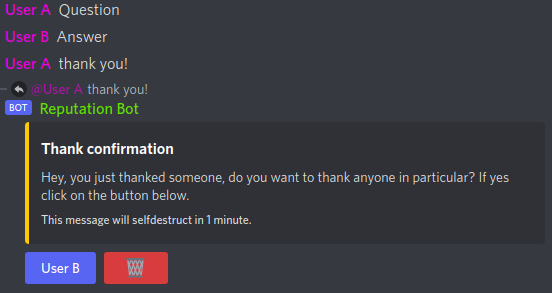
- Only the member who said thanks can click the buttons.
- You can pick as many members as one message may reward (Max Message Reputation).
- Members who can't receive reputation from you right now, for example because of a cooldown, are left out.
- The embed deletes itself after one minute. You can also delete it with its delete button.
Direct embed
If only one member could be in the embed, the bot can skip it and give the reputation to that member right away. Turn on Direct Embed Reputation for this.
Reaction
React to a member's message with your server's reputation emoji. The author of the message receives the reputation. Your server sets a main reaction and, as a supporter feature, additional ones. See thank words and reactions.
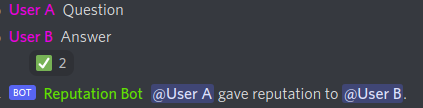
If the message you react to already gave someone reputation, for example a thank you, your reaction goes to that member instead. You agree with the thanks and add your own.
Command
With Command Reputation on, members can use /reputation <user> to give reputation. It is off by default, and
the command only shows up on servers that turned it on.
- The command works in every channel, not only in reputation channels.
- All other checks still apply, including the conversation checks. The Simple Reputation System preset turns those off for you.
- With Ephemeral Response on (shown below Command Reputation), only the giver sees the bot's answer. See reputation given by command.
- Supporters can give the command another name. See custom command names.