Profiles and rankings
Every member has a reputation profile, and every server has rankings. Both count reputation in your server's reputation mode.
Profiles
Use /profile to see your own profile, or /profile <user> for someone else's.
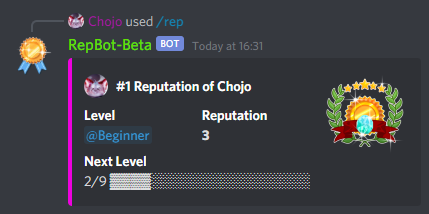
The profile shows:
- the member's rank on the server,
- their Level, which is their current rank role,
- the reputation they received and the reputation they gave,
- how far they are from the next level.
The bot can show a badge on the profiles of the highest ranked members. Which ranks get a badge depends on how the bot is set up.
Supporters can set the detailed option of /profile to true to get a detailed profile. It adds the rank for given
reputation, the members someone received the most from and gave the most to, and the channels where they gave and
received the most.
You can also open profiles in the dashboard under Dashboard > Profile. Use Share there to copy a link to your profile. In your User Settings, turn on Public Profile to let people open that link even when they don't share a server with you.
Rankings
Use /top to see the ranking of your server. It lists the members with the most received reputation, 10 per page.
To see another time frame than your server's reputation mode, pick a mode: /top mode:7 days. The modes are
total, 7 days, 30 days, week and month. See reputation modes.
/ranking offers more rankings. The mode option works the same as for /top.
| Command | What it shows |
|---|---|
/ranking server received | The members with the most received reputation. The same as /top. |
/ranking server given | The members who gave the most reputation. |
/ranking user received [user] | The members someone received the most reputation from. |
/ranking user given [user] | The members someone gave the most reputation to. |
Everything except /ranking server received is a supporter feature (Advanced Rankings). The same rankings are in
the dashboard under Dashboard > Ranking.
Members whose data is about to be removed because they left your server don't show up in rankings, and their profile shows no reputation. See removing reputation.
Custom command names
Supporters can give /reputation and /profile their own name on their server, for example /karma. Set them in
the dashboard under Settings > Command Names.
- A new name for
/reputationreplaces it. The name only shows up while command reputation is on. - A new name for
/profileis added next to it./profilekeeps working. - Names are 1 to 32 characters long and use lowercase letters, numbers,
-and_. - A name can't be the name of another command of the bot, and both commands can't share one name.
- Clear the name, or use Reset, to go back to the original name.
If your server loses the supporter feature, the custom names disappear within a minute or two. They come back when the feature is active again.